Best Desk Lamps for Eye Strain (2026)
⚠️ Price notice: Prices shown are approximate and subject to change. Always check Amazon for the current price before purchasing.
We may earn a commission from qualifying purchases made through our Amazon links. Disclosure.
The best LED desk lamps to reduce eye strain during long work sessions — compared for CRI, color temperature range, and flicker-free performance.
Poor desk lighting is a leading cause of eye strain, headaches, and reduced focus during work. The culprits are usually flicker, low color rendering (CRI), harsh cool color temperatures, and direct glare on your screen. A well-designed LED desk lamp eliminates all four. These are the best options in 2026 from $30 to $80.
What to look for
CRI (Color Rendering Index)
CRI measures how accurately a light renders colors compared to natural sunlight (CRI 100). For desk work, aim for CRI ≥ 90. High-CRI light is easier on the eyes, reduces strain, and makes text appear crisper. Most cheap desk lamps use CRI 80 or lower.
Flicker-Free Technology
LEDs driven by cheap power supplies flicker at 100–120Hz — invisible to the naked eye but detected by the brain, causing fatigue and headaches over hours. Look for 'flicker-free' or 'PWM-free' explicitly stated in specs. Some manufacturers use DC dimming which is entirely flicker-free.
Color Temperature Range
Color temperature (measured in Kelvin) affects alertness and eye comfort. 2700–3000K is warm white (relaxing, good for evenings). 4000K is neutral white (ideal for focused work). 5000–6500K is cool daylight (boosts alertness but can cause strain in the evening). Adjustable CCT lets you optimize for time of day.
Dimming Range
A lamp that can dim to 10% is important for late-night use alongside a monitor. Too-bright lighting creates extreme contrast with a bright monitor and causes eye fatigue. Smooth dimming across a wide range matters more than the maximum brightness.
Arm and Head Adjustability
A lamp you can position precisely to eliminate screen glare and illuminate your work surface without shining directly in your eyes is worth significantly more than a fixed lamp. Look for adjustable arms with stable joints that don't drift.
Our top picks

BenQ ScreenBar Halo 2
⭐ 4.7 (5,200+ reviews)
BenQ's ScreenBar Halo 2 mounts on top of your monitor and directs light downward onto your desk without creating any screen glare. The backlight (illuminating the wall behind your monitor) reduces the contrast ratio between your bright screen and dark surroundings — which is the primary cause of eye strain in dark rooms. Auto-dimming adjusts to ambient light. This is purpose-built for monitor-centric workstation setups.
⭐ Why we pick this: The only lamp that simultaneously lights your work surface and the wall behind your monitor to equalize contrast — addressing eye strain at the root cause rather than just adding more light.
Pros
- ✓Mounts on monitor — no desk space used
- ✓Zero screen glare by design
- ✓Backlight reduces monitor-to-room contrast ratio
- ✓Auto-dimming sensor
- ✓Touch controls on top of the bar
Cons
- ✗High price at $180
- ✗Requires flat monitor bezel to mount
- ✗No USB-C charging passthrough at base model

Lampat Dimmable LED Desk Lamp
⭐ 4.5 (20,000+ reviews)
Lampat's dimmable desk lamp delivers five brightness levels and touch-sensitive controls with a built-in USB charging port for $30. The flexible gooseneck arm holds position reliably, and the touch controls include a memory function so your preferred setting is restored at power-on. Flicker is minimal at full brightness — typical of budget LEDs it appears at the lowest dimming levels.
⭐ Why we pick this: 5 brightness levels, touch controls with memory, and a USB charging port at $30 — the most value-for-money configuration at this price point and genuinely adequate for most office desks.
Pros
- ✓5 brightness levels
- ✓Touch controls with memory
- ✓USB-A charging port built in
- ✓Flexible gooseneck arm
- ✓Compact footprint
Cons
- ✗No color temperature adjustment
- ✗Flicker visible at lowest brightness settings
- ✗CRI not published by manufacturer
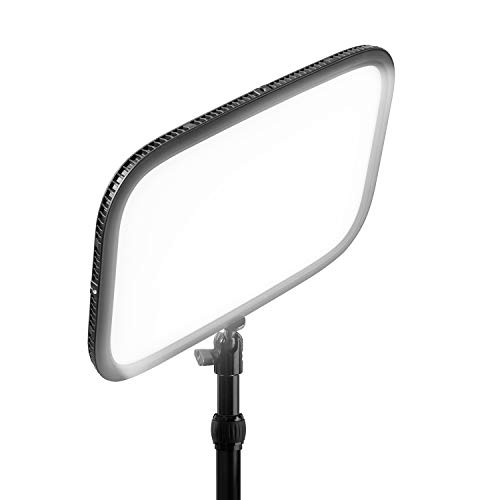
Elgato Key Light
⭐ 4.6 (14,400+ reviews)
Elgato's Key Light is primarily marketed at streamers and video creators but makes an exceptional desk lamp for video call users. The 2800K–7000K range, desk-mount arm, and app/Elgato Stream Deck control let you dial in the perfect facial lighting for calls. CRI 90+ and high-luminance make faces look genuinely flattering on camera.
⭐ Why we pick this: If video calls are part of your work, proper key lighting is more impactful than any webcam upgrade. The Key Light delivers CRI 90+ light at the right angle for faces.
Pros
- ✓CRI 90+ for excellent skin tone rendering
- ✓2800K–7000K full range
- ✓App control (macOS, iOS, Android)
- ✓Desk clamp included
- ✓Compatible with Elgato Stream Deck
Cons
- ✗Designed for lighting faces — not ideal as a traditional task lamp
- ✗No battery (AC power only)
- ✗Arm is fixed height
Our verdict
For monitor-centric workstations, the BenQ ScreenBar Halo 2 is the best investment for eye strain reduction — it addresses the contrast ratio problem that no floor or desk lamp can fix. For traditional desk lamps under $50, the Lampat Dimmable LED Desk Lamp offers the best value. The Elgato Key Light is purpose-built for video calls.
Frequently asked questions
What color temperature is best for working at a desk?
Does desk lamp brightness matter for eye strain?
What is CRI and why does it matter for a desk lamp?
Should my desk lamp shine on my monitor or away from it?
Prices may vary. Check Amazon for current pricing.